
Batteries in PLC Servo-Driven Pad Printers: What They Do and Why They Matter

Updated: 1 day ago
Your pad printer ran fine before the holiday shutdown. You come back, flip it on, and the screen is full of alarms. The axes won’t move until you re-home them, the clock is wrong, and a few settings you swear you saved are gone.
Nine times out of ten, the culprit is a small battery you probably forgot was in there. Servo-driven pad printers with a PLC rely on a few of these batteries to remember things while the power is off. When they run low, the machine forgets.
Here’s what those batteries do, why they matter, and how to keep them from costing you a morning of downtime.
The Short Answer
The batteries in a servo-driven pad printer keep the machine’s memory alive when the power is off. Depending on the model, that can mean the PLC’s clock and saved data, the servo motors’ position, and the touchscreen’s settings. A healthy battery means you turn the machine on and it picks up where it left off. A dead one can mean alarms, re-homing every axis, or in some cases reloading the program.
How It Works
Most servo-driven pad printers have up to three batteries doing three different jobs.
The PLC Battery
The PLC is the machine’s brain. It runs the print cycle, the timing, and the sequence of moves. Its battery keeps the internal clock running and holds on to data that needs to survive a power-off, like counters and stored settings. On some older PLCs, the battery also protects the program itself. Newer units usually store the program in permanent memory, but they still lean on the battery for the clock and saved values.

The Servo Encoder Battery
This is the one that causes the most headaches. Servo motors with absolute encoders always know exactly where they are, even after the machine is shut off. That’s what lets the pad and the cliché move to the right spot the moment you power up. The encoder battery is what keeps that position memory alive while the power is off. When it dies, the servo forgets where it is and the drive throws an alarm until the axis is re-homed or its origin is reset.
The HMI Battery
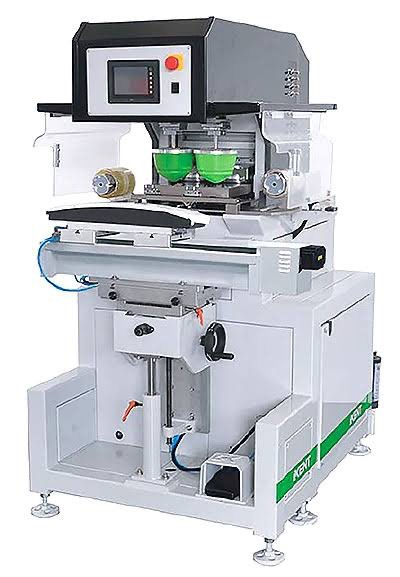
The HMI is the touchscreen operators use. Many have a small battery that keeps the clock and some settings. A dead HMI battery is usually more of an annoyance than a shutdown, but wrong timestamps on alarms and logs can make troubleshooting harder.
At a Glance
Battery | What It Protects | What You’ll Notice When It’s Dead | How Serious |
Servo encoder battery | Each axis’s position while power is off | Encoder or position alarms at startup; axes need re-homing or an origin reset | High: machine won’t run until fixed |
PLC battery | Clock, counters, saved settings (and the program on some older units) | Wrong date/time, lost counts or settings, battery alarm; possible program loss on older PLCs | Medium to high |
HMI battery | Screen clock and some settings | Wrong timestamps on alarms and logs, reset preferences | Low |
Why Idle Machines Are the Riskiest
It sounds backwards, but these batteries work hardest when the machine is turned off. While the printer has power, the PLC and servo drives run off the main supply and the batteries mostly sit idle. Once the power is cut, the batteries take over and start draining.
That’s why problems tend to show up after long breaks: holiday shutdowns, a machine pulled off the line for a few weeks, or a spare printer sitting in storage. A battery that would have lasted years on a machine running every day can run down much faster on one that sits powered off.
What Happens When a Battery Dies
A dead battery rarely damages the machine, but it can stop production until someone sorts it out.
Startup alarms. The servo drives or PLC flag a battery or encoder error, and the printer won’t cycle until it’s cleared.
Lost position. Each affected axis has to be re-homed or have its origin reset. On a multi-axis machine, that can take real time and the right know-how.
Lost data. Counters, saved job settings, or the clock reset. On older PLCs that store the program in battery-backed memory, the program itself can be wiped.
Misprints after restart. If an axis is homed incorrectly, the pad may not land where it should, so the first parts off the line need a careful check.
How to Stay Ahead of It
The good news: battery problems are some of the easiest to prevent.
Don’t ignore low-battery warnings. Most PLCs and servo drives warn you well before the battery is fully dead. Treat that warning as a work order, not a reminder.
Replace on a schedule. Don’t wait for an alarm. Put battery changes on your preventive maintenance calendar based on the manufacturer’s recommendation.
Follow the manual when you swap them. Many servo encoder batteries are meant to be changed with control power on, so the position memory isn’t lost during the swap. Check the procedure for your machine before you start.
Back up the PLC program and settings. Keep a current copy so a dead battery or a failed swap means a quick reload, not a call to rebuild the program.
Keep spares on hand. These batteries are small and inexpensive, but not always in stock locally. Having the right ones on the shelf saves days of waiting.
Power up idle machines now and then. If a printer will sit for weeks, turning it on periodically, or checking its batteries before you bring it back, can save a rough restart.
Questions to Ask About Your Machine
If you’re not sure where your printer stands, these questions are a good place to start, whether you’re asking your maintenance team or your equipment supplier:
How many batteries does this machine have, and where are they?
Which battery types and part numbers do we need?
Should the servo batteries be changed with power on or off?
How often should each one be replaced?
Do we have a current backup of the PLC program and settings?
What’s the re-homing procedure if an axis loses its position?
FAQ
What happens if the servo battery dies?
The servo loses track of its position while the machine is off. At startup you’ll get an encoder or position alarm, and that axis needs to be re-homed or have its origin reset before the printer will run.
Can a dead PLC battery erase my program?
On some older PLCs, yes. Most newer PLCs keep the program in permanent memory, but you can still lose the clock, counters, and saved settings. Either way, a current backup is cheap insurance.
How often should the batteries be replaced?
It depends on the manufacturer and how much time the machine spends powered off. Follow the interval in your machine’s manual, and replace them sooner if you see a low-battery warning.
Can I change the batteries with the power on?
For many servo encoder batteries, that’s actually the recommended way, because it keeps the position memory intact. Procedures vary by machine, so always check the manual first.
Why did my printer throw alarms after sitting idle?
Batteries drain fastest when the machine is powered off. A long shutdown can run a weak battery down to the point where the PLC or servos lose their memory
Don't Wait for a Warning
A low-battery warning only helps if it shows up in time and someone actually sees it. Batteries can quit with little or no notice, especially on a machine that's been sitting powered off, so one day it works and the next you're staring at a screen full of alarms. That's why our rule of thumb is to replace these batteries every 2 to 3 years, no questions asked, or sooner if your manual calls for it. A few dollars in batteries is a lot cheaper than a morning of downtime.
.
Need Help With Your Pad Printer?

At Diversified Printing Techniques, we’ve been building and servicing pad printing equipment for decades. If your machine is throwing battery or encoder alarms, needs replacement batteries, or you’d like to set up a preventive maintenance plan so it doesn’t happen again, our team can help.
Contact DPT today to talk with someone who knows your equipment.


Comments