
RUCO T200 Ink: A Practical Guide for Pad and Screen Printers

If you print on plastics, there’s a good chance someone has already recommended RUCO T200 to you. It’s one of the most universal pad printing inks out there, and for good reason. It sticks to a long list of common plastics, dries fast, and can run as a simple one-part ink or a tougher two-part system with hardener.
But “versatile” doesn’t mean “foolproof.” Getting good results with T200 comes down to the right thinner, the right hardener mix, and knowing what your substrate needs before you print.
Here’s what T200 is, what it prints on, and how to get the most out of it.
The Short Answer
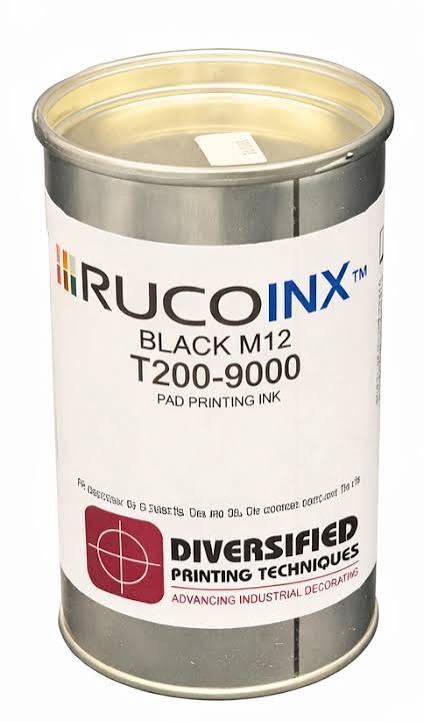
RUCO T200 is a glossy, solvent-based ink for pad and screen printing on most common plastics, including ABS, polycarbonate, acrylic, rigid PVC, polystyrene, and pre-treated PE and PP. You can run it as a one-component
ink for general work, or add hardener for better chemical and scratch resistance. It dries to the touch in about 30 seconds and can keep up with machines running up to 4,000 parts per hour.
What T200 Prints On
T200 is built for plastics, and it covers most of the ones you’ll see on a production floor:
ABS
Acrylic (PMMA)
Rigid PVC
Polycarbonate
Polystyrene
SAN
Nylon (PA)
PET
Pre-treated PE and PP
Coated surfaces like painted wood
Paper and carton
A few things to keep in mind:
PE and PP have to be pre-treated. Polyethylene and polypropylene need flame or corona treatment before T200 will stick. RUCO calls for a surface tension of at least 42 dynes for PE and 52 dynes for PP.
Watch for stress cracking. On ABS, acrylic, and styrene, certain solvents can cause tiny cracks in the part. Test first.
Clean the part. Mold release agents, antistatic coatings, and slip additives can kill adhesion. Make sure they’re removed before printing.
No matter the material, always run an adhesion test on your actual parts before production. Two parts made of “the same plastic” can behave very differently.
How It Works: One-Part vs. Two-Part
One of the best things about T200 is that you can choose how tough you need it to be.
One-Component (No Hardener)
The ink dries by solvent evaporation. It’s simpler to work with, there’s no pot life to worry about, and it’s a good fit for general-purpose printing where the part won’t see harsh chemicals or heavy wear.
Two-Component (With Hardener)

Adding hardener makes the ink chemically cross-link as it cures. You get better resistance to chemicals, cleaners, and abrasion, plus stronger adhesion. The trade-off is that you have a working window (pot life), and full strength takes time to develop.
If your parts will be handled a lot, wiped with cleaners, or need to pass a durability test, the two-part route is usually the way to go.
At a Glance
Ink type: Solvent-based, glossy, pad and screen printing
Use: One-component or two-component (with hardener)
Dry to touch: About 30–35 seconds at 70°F
Full cure with hardener: About 36 hours at 70°F
Max speed: Up to 4,000 parts per hour with fast-drying units
Thinner amount: 25–35%
Hardener amount: About 10% (up to 20%)
Pot life with hardener: At least 12 hours at 70°F
Shelf life: 36 months unopened at 70°F (6 months for metallic and effect inks)
Thinners and additives:
Thinner, slow (600–1,800 parts/hour): 100VR1453
Thinner, standard (1,800–2,800 parts/hour): 100VR1450
Thinner, fast (2,800–5,000 parts/hour): 100VR1440
Retarder (screen printing): 100VR1170
Hardener, standard: 100VR1433
Leveling agent: 100VR133
Cleaner: 100VR1272
Choosing the Right Thinner
T200 always needs thinner before it goes on the machine, usually 25–35%. The trick is matching the thinner to your print speed:

Slow thinner for slower machines or larger images that need more open time.
Standard thinner for most everyday production.
Fast thinner for high-speed lines where the ink needs to flash off quickly.
If your ink is drying in the cliché or on the pad before it transfers, try a slower thinner. If prints are smearing or staying wet too long, go faster. For screen printing, RUCO recommends the slow thinner along with the retarder.
Working With Hardener
Hardener makes T200 much tougher, but it comes with a few rules:
Mix it right. About 10% is the standard addition, with up to 20% allowed.
Watch the clock. Once mixed, you have a pot life of at least 12 hours at 70°F. Don’t mix more than you’ll use.
Keep it warm. Don’t let the printed parts drop below about 59°F while they cure, or cross-linking stops.
Keep it dry. The hardener is sensitive to humidity, so avoid damp conditions for an open container of hardener. Keep the cap on tight.
Plan multicolor jobs. All colors need to be printed within 36 hours. Once the ink is fully cured, it can’t be printed over.
Be patient. Full chemical resistance and adhesion take about 36 hours to develop. Don’t judge a rub test too early.
Colors and Color Matching
T200 is built around a mixing system of 10 base colors plus a clear base, so you can mix a wide range of shades. RUCO has proven formulas for Pantone, RAL, and HKS colors. There are also four-color process inks, extra-opaque white and black, an overprint lacquer, and metallic shades.
If you need an exact brand color, a custom color match is the easiest way to get it right the first time.
Safety and Compliance
T200 is free of phthalates, BPA, cyclohexanone, and aromatic solvents. Its raw materials meet the medical requirements for Class VI ink and also meets EN 71-3 toy safety limits for heavy metals, though metallic inks should be checked separately. It can also be used on the non-food-contact side of food packaging when printed properly.
Always check the Safety Data Sheet for handling and storage details and we would be more than happy to provide you with one.
Questions to Ask Before You Print
What exactly is the part made of, and has it been tested with T200?
Is the surface clean of mold release, slip agents, and antistatic coatings?
If it’s PE or PP, has it been flame or corona treated to the right dyne level?
Does the part need chemical or abrasion resistance? (If yes, use hardener.)
What’s your print speed, and which thinner fits it?
Will the shop stay above 59°F and out of high humidity while parts cure?
FAQ
What plastics does RUCO T200 work on?
ABS, acrylic, polycarbonate, rigid PVC, polystyrene, SAN, nylon, PET, and pre-treated PE and PP, along with coated surfaces and paper. Always test your specific parts first.
Do I need to use hardener with T200?
No. It works as a one-part ink. Add hardener when you need better chemical resistance, scratch resistance, or adhesion.
How long does T200 take to dry?
About 30–35 seconds to the touch at 70°F. With hardener, full cure takes about 36 hours to air dry. A heating conveyor can speed up this process.
How much thinner should I add?
Usually 20%. Pick slow, standard, or fast thinner based on your print speed.
Can T200 print on polypropylene?
Yes, but only after the PP is flame or corona treated to at least 52 dynes.
What’s the shelf life of T200?
2 years unopened when stored at about 70°F. Metallic and effect inks last about 6 months. Hotter storage shortens shelf life.
Why is my T200 not sticking?The most common causes are an untreated or contaminated surface, the wrong thinner, curing in a cold or humid space, or testing adhesion before the ink has fully cured.
Need Help With RUCO T200?
At Diversified Printing Techniques, we work with RUCO T200 every day. Whether you need the right thinner and hardener for your line, a custom color match, or help troubleshooting adhesion, our team can help you get it dialed in.
Contact DPT today to talk with someone who knows your ink and click here for a RUCO T200 Technical Data Sheet


Comments